Powerful ERP Software Comparison for Smart Business Decisions
admin">admin | January 19, 2026 | Accounting Software & ERPRunning a business today means juggling dozens of tasks at once. You need to track inventory, manage finances, handle customer orders, and keep employees on the same page. That’s where ERP software comes in. This powerful tool brings all your business operations under one roof, making life easier for everyone involved.
But here’s the catch: not all ERP systems are created equal. Some work better for small businesses, while others shine in large enterprises. Some focus on manufacturing, while others excel in retail or services. This guide will walk you through everything you need to know about comparing different ERP software options so you can make a smart choice for your business.
What Makes ERP Systems Worth Your Time
Before diving into comparisons, let’s talk about why businesses invest in ERP software in the first place. Think of an ERP system as the brain of your company. It connects different departments and processes, so information flows smoothly from one area to another.
When your sales team closes a deal, the system automatically updates inventory levels. Your finance team sees the revenue in real-time. Your warehouse gets a notification to ship the product. All of this happens without anyone sending emails or making phone calls. That’s the magic of integrated business software.
Companies that use ERP systems typically see fewer errors, faster processes, and better decision-making. They can pull reports in seconds instead of spending days compiling data from different spreadsheets. They know exactly what’s happening in their business at any moment.
Key Features Every Business Should Consider
When you start comparing ERP software options, certain features matter more than others. Let’s break down what you should look for.
Financial Management Tools
Every ERP system handles money differently. The best ones track every dollar coming in and going out. They manage accounts payable and receivable, create financial statements, and help with budgeting. Some systems even handle multiple currencies if you work with international clients.
Look for software that makes accounting easier, not harder. Can it automatically match bank transactions? Does it generate tax reports? Will your accountant be able to work with it easily?
Inventory and Supply Chain Control
If you sell physical products, inventory management becomes crucial. Good ERP software tells you exactly what’s in stock, where it’s located, and when you need to reorder. It tracks products from the moment you order them from suppliers until they reach your customers.
Advanced systems even predict future inventory needs based on past sales patterns. They alert you before you run out of popular items and warn you about slow-moving stock that’s taking up space.
Customer Relationship Management
Your customers are the lifeblood of your business. ERP systems with strong CRM features help you track every interaction with clients. You can see purchase history, preferences, support tickets, and communication logs all in one place.
This information helps your team provide better service. When a customer calls, your staff instantly sees their complete history. No more asking customers to repeat information they’ve already shared.
Human Resources and Payroll
Managing people involves a lot of paperwork. Time tracking, payroll processing, benefits administration, and performance reviews all create data that needs organizing. The right ERP software handles these HR tasks smoothly.
Employees can request time off through the system. Managers approve it with one click. Payroll automatically adjusts. Everyone stays informed without endless email chains.
Top ERP Solutions in Today’s Market
Now let’s compare some popular ERP systems. Each one has strengths and weaknesses depending on your business needs.
SAP Business One
SAP dominates the enterprise software world. Their Business One product targets small and medium-sized companies. It’s powerful but comes with a steep learning curve.
The system excels at financial management and reporting. It handles complex business processes well. However, it requires significant training and often needs customization to fit specific industries.
Cost-wise, SAP sits on the higher end. You’ll pay for licenses, implementation, training, and ongoing support. But many companies find the investment worthwhile for the robust features they get.
Oracle NetSuite
NetSuite runs entirely in the cloud, which means you access it through a web browser. No software to install or servers to maintain. This makes it popular with growing businesses that don’t want to deal with IT infrastructure.
The platform handles everything from accounting to e-commerce. It scales well as companies grow. Starting small? NetSuite works. Expanding to new countries? It adapts.
The subscription-based pricing means predictable monthly costs. However, those costs can climb quickly as you add more users and modules.
Microsoft Dynamics 365
Microsoft brings familiar interfaces to ERP software. If your team already uses Office 365 and other Microsoft products, Dynamics 365 integrates seamlessly.
The system offers flexibility through modular design. Buy only the features you need now. Add more later as your requirements change. This approach keeps initial costs lower than buying a complete package upfront.
Microsoft’s strong presence in business software means plenty of consultants and support resources are available. Getting help is never difficult.
Odoo
Here’s something different: Odoo offers an open-source option. The community edition is free, though businesses usually pay for the enterprise version to get support and extra features.
Odoo works well for companies wanting customization without huge costs. Developers can modify the code to fit exact needs. The app-based structure lets you pick and choose modules.
The downside? You might need technical expertise to get the most from it. The interface isn’t as polished as commercial alternatives. But for budget-conscious businesses willing to invest some effort, Odoo delivers impressive value.
Acumatica
Acumatica targets companies in specific industries like distribution, manufacturing, and retail. It’s cloud-based and charges based on resources used rather than user counts.
This pricing model helps companies with many employees who only occasionally access the system. Everyone can have login credentials without doubling or tripling costs.
The system is known for flexibility and relatively easy customization. The interface is clean and modern, making training easier.
Breaking Down the Costs
Price matters, but understanding what you’re paying for matters more. Let’s examine the true cost of ERP software.
Upfront Expenses
Some systems require large initial payments. You buy software licenses, pay for implementation services, and cover training costs. This can mean tens of thousands or even hundreds of thousands of dollars before the system goes live.
Other systems use subscription models with smaller upfront costs. You pay monthly or annually instead of buying everything at once.
Implementation and Customization
Getting an ERP system running takes time and expertise. Most businesses hire consultants to handle implementation. These professionals configure the software, migrate data from old systems, and customize features to match business processes.
Implementation costs often exceed software costs. A system with a $50,000 license might require $100,000 in implementation services. Always budget for this reality.
Training and Change Management
New software means new ways of working. Employees need training to use the system effectively. Some people adapt quickly. Others resist change.
Good ERP software companies provide training materials, videos, and hands-on sessions. Factor in the cost of time employees spend learning instead of doing their regular jobs.
Ongoing Maintenance and Support
Software needs updates, bug fixes, and technical support. With cloud systems, providers handle maintenance automatically. On-premise systems require IT staff or service contracts.
Annual support fees typically run 15-25% of the initial license cost. Cloud subscriptions include support, but prices increase over time as vendors add features and adjust for inflation.
Comparison Table: Leading ERP Systems
| Feature | SAP Business One | Oracle NetSuite | Microsoft Dynamics 365 | Odoo | Acumatica |
|---|---|---|---|---|---|
| Deployment | On-premise or Cloud | Cloud Only | Cloud Only | On-premise or Cloud | Cloud Only |
| Best For | Mid-size enterprises | Growing businesses | Microsoft-focused companies | Budget-conscious firms | Industry-specific needs |
| Starting Price | $50,000+ | $999/month | $70/user/month | Free (Community) / $20/user/month (Enterprise) | $1,200/month |
| Customization | High (requires expertise) | Moderate | Moderate to High | Very High (open source) | High |
| Learning Curve | Steep | Moderate | Gentle | Moderate | Moderate |
| Mobile Access | Yes | Yes | Excellent | Yes | Yes |
| Third-party Integrations | Extensive | Extensive | Excellent (Microsoft ecosystem) | Good | Good |
| Support Quality | Excellent | Good | Excellent | Community-based or Paid | Good |
How to Choose the Right System for Your Business
Comparing features on paper only tells part of the story. Here’s how to make a choice that actually works for your specific situation.
Assess Your Current Pain Points
What problems are you trying to solve? Make a list of the biggest headaches in your current operations. Maybe inventory tracking is a mess. Perhaps generating financial reports takes too long. Or different departments can’t share information easily.
Rank these problems by importance. Then look for ERP software that specifically addresses your top issues. Don’t get distracted by fancy features you don’t need.
Consider Your Industry
Some ERP systems specialize in certain industries. A manufacturer needs different tools than a retail store. A construction company has different requirements than a healthcare provider.
Industry-specific systems include features and workflows designed for your type of business. They use terminology you understand. Reports match what you need for compliance and decision-making.
Think About Growth Plans
Where will your business be in five years? Good ERP systems grow with you. They handle more transactions, support more users, and expand to new locations without breaking.
Choosing software that’s perfect for today but can’t scale costs more in the long run. You’ll eventually need to switch systems, repeating the implementation process and retraining everyone.
Evaluate Vendor Stability
The company behind your ERP software matters as much as the software itself. Research their financial stability, customer satisfaction ratings, and track record.
A vendor going out of business leaves you stranded with unsupported software. Choose companies with proven longevity and strong customer bases.
Test Before Committing
Most vendors offer demos or trial periods. Use them. Get your team involved. Have actual employees test the software doing real tasks from their daily work.
This hands-on experience reveals usability issues and feature gaps that aren’t obvious in sales presentations. It also helps build buy-in from staff who will use the system daily.
Common Mistakes to Avoid
Learning from others’ mistakes saves time and money. Here are pitfalls to watch out for when selecting ERP software.
Focusing Only on Price
The cheapest option often costs more in the long run. Hidden costs emerge during implementation. Limited features require workarounds. Poor support leads to downtime and frustration.
Instead, focus on total cost of ownership over five years. Include all expenses: licensing, implementation, training, support, and potential productivity losses during transition.
Ignoring User Adoption
The most powerful system fails if employees won’t use it. Software that’s too complicated or doesn’t match actual workflows gets abandoned. Staff find workarounds, creating the data silos you wanted to eliminate.
Involve future users in the selection process. Listen to their concerns. Choose software they believe will make their jobs easier, not harder.
Underestimating Implementation Time
Vendors often quote optimistic timelines. Real-world implementations take longer than planned. Data migration hits snags. Customizations take more work than expected. Training needs extend beyond initial estimates.
Add buffer time to any vendor timeline. Plan for 25-50% longer than quoted. This prevents scheduling conflicts and reduces pressure on implementation teams.
Skipping Data Cleanup
Garbage in, garbage out. Migrating messy data to a new system just transfers problems to a new platform. Take time to clean data before migration.
Remove duplicates, correct errors, and standardize formats. This painful process pays dividends once the new system launches. Clean data means accurate reports and better decision-making.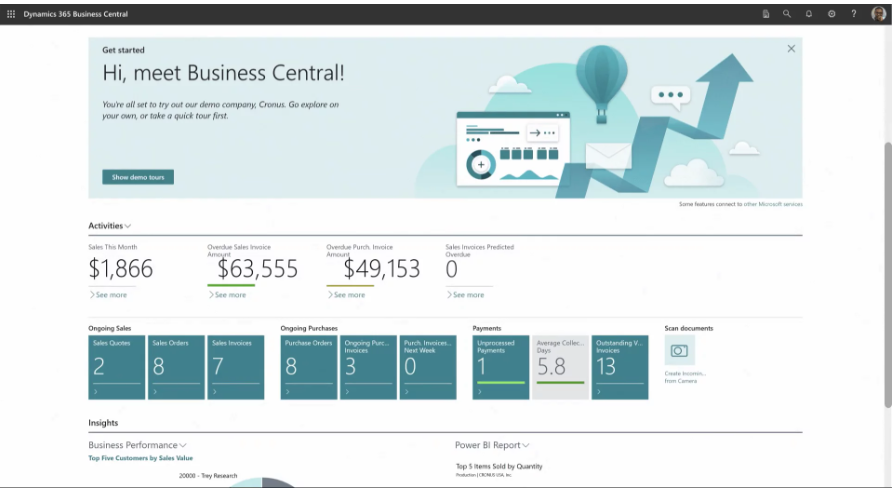
Making the Final Decision
After researching, demoing, and comparing, you need to make a choice. Here’s a framework for that final decision.
Start by creating a scorecard. List your must-have features and nice-to-have features. Rate each ERP system against these criteria. Assign weights based on importance. Total the scores.
Get input from different stakeholders. IT staff care about technical aspects. Finance teams focus on reporting and compliance. Department managers want ease of use. Consider all perspectives.
Request detailed proposals from your top two or three choices. Ask for pricing breakdowns, implementation timelines, and support terms. Look for hidden costs or unclear language.
Check references. Talk to companies similar to yours that use each system. Ask about implementation experiences, ongoing support, and whether they’d choose the same software again.
Finally, trust your gut. If something feels off about a vendor or system, explore those concerns. The best ERP software on paper might not be the best fit for your unique situation.
Frequently Asked Questions
How long does ERP implementation typically take?
Most small to medium businesses complete implementation in 3-6 months. Larger companies or complex customizations can take 12-18 months. Timeline depends on company size, data quality, customization needs, and available resources.
Can we implement ERP in phases?
Yes, phased implementation reduces risk and spreads costs over time. Many companies start with core financial modules, then add inventory management, followed by CRM and other features. This approach lets staff adapt gradually.
What’s the difference between cloud and on-premise ERP?
Cloud ERP runs on vendor servers accessed via internet. You pay subscriptions and the vendor handles maintenance. On-premise ERP installs on your servers. You own licenses and handle all maintenance. Cloud offers easier setup and scaling. On-premise provides more control and potentially lower long-term costs.
How often do ERP systems need updates?
Cloud systems update automatically, often quarterly or monthly. On-premise systems typically release major updates annually with smaller patches throughout the year. Critical security updates happen as needed.
Will ERP software replace our current accounting software?
Most ERP software includes comprehensive accounting features designed to replace standalone accounting programs. However, some businesses keep specialized accounting tools and integrate them with ERP. Discuss your specific setup with vendors.
What happens to our data if we switch ERP vendors?
Reputable vendors provide data export tools. You can extract your information in standard formats. However, migrating to a new system still requires significant effort to map data to the new structure. Choose your ERP carefully to avoid switching frequently.
Do we need to hire new IT staff for ERP?
It depends on your choice. Cloud systems require less internal IT support. On-premise systems need dedicated staff or outsourced IT services. Many businesses rely on vendor support contracts rather than expanding IT teams.
Can ERP integrate with our existing software?
Modern ERP software offers integration capabilities through APIs (application programming interfaces). Popular business tools often have pre-built integrations. Custom software may require development work. Always verify integration possibilities before committing.
Your Path Forward
Choosing ERP software ranks among the most important decisions a business makes. The right system streamlines operations, cuts costs, and provides insights that drive growth. The wrong choice leads to frustration, wasted money, and competitive disadvantages.
Take your time with this decision. Rushing leads to regret. Involve your team throughout the process. Their input and buy-in determine success as much as the software features.
Remember that no perfect system exists. Every option involves trade-offs between features, cost, ease of use, and flexibility. Focus on finding the best fit for your specific needs rather than the objectively “best” software.
Once you implement your chosen system, commit to making it work. Provide adequate training. Give staff time to adapt. Address concerns quickly. Celebrate wins as the system starts delivering results.
The businesses that get the most from ERP are those that view it as a long-term investment in efficiency and growth. They continuously optimize how they use the system. They take advantage of new features as vendors release them. They treat ERP as a evolving tool rather than a one-time purchase.
Your journey to better business management starts with understanding your needs and carefully comparing options. Armed with the information in this guide, you’re ready to make a smart choice that serves your company for years to come.


