Critical ERP Features Every Business Must Evaluate Before Buying
admin">admin | January 19, 2026 | Accounting Software & ERPChoosing the right Enterprise Resource Planning (ERP) system can make or break your business operations. The ERP features you select today will determine how smoothly your company runs tomorrow. Many businesses rush into ERP purchases without fully understanding what they need. This mistake costs them time, money, and countless headaches down the road.
An ERP system connects all your business processes into one central platform. It handles everything from accounting and inventory to human resources and customer relationships. However, not all ERP systems are created equal. Some work perfectly for manufacturing companies but fall short for retail businesses. Others excel at financial management but struggle with supply chain operations.
This guide breaks down the essential features you must evaluate before signing any contract. We’ll explore what truly matters and help you avoid expensive mistakes. Whether you’re running a small startup or managing a large corporation, understanding these critical features will save you from future regrets.
Core Financial Management Capabilities
Financial management sits at the heart of every ERP system. Your business cannot survive without accurate financial tracking and reporting. The right financial ERP features give you complete visibility into your company’s money flow.
General Ledger and Accounting Functions
A robust general ledger forms the foundation of financial management. This feature records every single transaction that happens in your business. It tracks money coming in and going out with precision. The system should automatically categorize expenses, revenues, and other financial activities.
Look for real-time updates in your general ledger. Old systems require manual entry and daily closing procedures. Modern solutions update instantly as transactions occur. This immediate visibility helps you make better decisions faster.
The accounting module must handle accounts payable and receivable efficiently. It should generate invoices automatically and track payment deadlines. Late payments hurt cash flow, so automated reminders and follow-ups become essential tools.
Financial Reporting and Analytics
Reports turn raw numbers into actionable insights. Your ERP should generate profit and loss statements, balance sheets, and cash flow reports with just a few clicks. Custom report building lets you focus on metrics that matter most to your business.
Dashboard features provide quick snapshots of financial health. Visual charts and graphs make complex data easy to understand. You shouldn’t need a finance degree to grasp your company’s current financial position.
Multi-currency support matters for businesses operating internationally. The system must handle exchange rates automatically and accurately. It should convert currencies in real-time and account for fluctuations in financial statements.
Budget Management and Forecasting
Planning for the future requires solid budgeting tools. The ERP should let you create detailed budgets by department, project, or time period. It must track actual spending against budgeted amounts and alert you when limits approach.
Forecasting capabilities help predict future financial performance. The system analyzes historical data and current trends to project revenue and expenses. This forward-looking view helps you prepare for challenges and opportunities ahead.
Inventory and Supply Chain Control
Managing inventory efficiently separates successful businesses from struggling ones. Poor inventory control leads to stockouts, overstocking, and unhappy customers. The right inventory ERP features prevent these problems before they start.
Real-Time Inventory Tracking
Knowing exactly what you have, where it is, and how much it costs provides tremendous advantages. Real-time tracking updates inventory levels instantly as items move in and out. You’ll never wonder about stock levels again.
The system should track inventory across multiple locations. Whether you have one warehouse or fifty stores, you need unified visibility. Barcode scanning and RFID integration make physical counting faster and more accurate.
Serial number and lot tracking become crucial for certain industries. These features let you trace individual items from supplier to customer. When recalls happen or quality issues arise, you can identify affected products immediately.
Automated Reordering and Procurement
Running out of popular products costs you sales and damages customer trust. Automated reordering prevents stockouts by monitoring inventory levels constantly. When quantities drop below preset thresholds, the system generates purchase orders automatically.
Smart procurement features analyze supplier performance, pricing, and delivery times. The ERP recommends the best vendors based on your requirements and past experiences. This optimization reduces costs while maintaining quality standards.
Purchase order management streamlines the entire procurement process. From requisition to receipt, every step gets tracked and documented. Approvals flow through the system automatically, eliminating paper trails and lost documents.
Warehouse Management Integration
Efficient warehouse operations depend on organized systems and clear processes. Warehouse management features optimize storage locations based on item characteristics and turnover rates. Fast-moving products get placed in easily accessible areas.
The system should support various picking methods like wave picking, batch picking, and zone picking. It generates optimized pick lists that reduce travel time and increase productivity. Workers spend less time searching and more time fulfilling orders.
Shipping integration connects your ERP to carriers and logistics providers. The system calculates shipping costs, prints labels, and tracks packages automatically. Customers receive tracking information without manual intervention.
Customer Relationship Management Tools
Strong customer relationships drive business growth and sustainability. CRM ERP features help you understand customer needs, preferences, and behaviors. This knowledge lets you serve them better and build lasting loyalty.
Contact and Lead Management
Every customer interaction matters. The CRM module stores complete contact histories including emails, calls, meetings, and purchases. Sales teams access this information instantly, providing personalized service that impresses customers.
Lead tracking follows potential customers through your sales pipeline. The system records how leads discover your business and tracks their journey toward purchase. This visibility helps identify which marketing efforts actually work.
Automated lead scoring ranks prospects based on their likelihood to buy. The system analyzes engagement levels, demographics, and behaviors. Sales teams focus their energy on the most promising opportunities instead of chasing dead ends.
Sales Pipeline Visibility
Understanding where deals stand in your sales process prevents surprises and missed opportunities. Pipeline visualization shows every active opportunity and its current stage. Sales managers spot bottlenecks and can intervene when deals stall.
Forecasting tools predict future revenue based on pipeline health and historical conversion rates. These projections help with resource planning and goal setting. Accuracy improves as the system learns from actual outcomes over time.
Activity tracking ensures sales representatives stay productive and follow up consistently. The system logs calls, emails, and meetings automatically. Managers review activity levels and provide coaching when needed.
Customer Service and Support
After-sale support determines whether customers return or look elsewhere. Ticketing systems organize customer issues and route them to appropriate team members. Priority levels ensure urgent problems get immediate attention.
Knowledge base integration gives support teams instant access to solutions and troubleshooting guides. They resolve issues faster without repeatedly asking supervisors for help. Customers experience shorter wait times and better outcomes.
Customer portals let clients check order status, download invoices, and submit support requests themselves. This self-service capability reduces workload on your team while improving customer satisfaction.
Human Resources and Payroll Functions
Employees represent your most valuable asset and biggest expense. HR and payroll ERP features streamline people management while ensuring compliance with regulations. These tools reduce administrative burden and improve employee satisfaction.
Employee Information Management
Centralized employee records eliminate scattered spreadsheets and filing cabinets. The system stores personal information, employment history, performance reviews, and certifications in one secure location. Authorized personnel access only the information they need.
Organizational charts visualize company structure and reporting relationships. These dynamic diagrams update automatically as people join, leave, or change positions. Everyone understands where they fit in the larger organization.
Document management handles employment contracts, tax forms, and policy acknowledgments digitally. Electronic signatures speed up paperwork while maintaining legal validity. Storage costs drop as paper files become unnecessary.
Time and Attendance Tracking
Accurate time tracking ensures employees get paid correctly for hours worked. The system records clock-ins, clock-outs, and breaks automatically. Various time capture methods include biometric scanners, mobile apps, and web-based time clocks.
Overtime calculations happen automatically based on company policies and labor laws. The system flags potential violations before they occur. Managers approve or reject overtime requests with full visibility into budget impacts.
Absence management tracks vacation days, sick leave, and other time off. Employees submit requests through the system, and approvals flow through established workflows. Balance tracking prevents scheduling conflicts and ensures adequate coverage.
Payroll Processing and Compliance
Payroll mistakes damage employee trust and create legal headaches. Automated payroll processing eliminates manual calculations and reduces errors dramatically. The system handles regular wages, overtime, bonuses, and deductions flawlessly.
Tax compliance features stay current with changing federal, state, and local regulations. The system calculates withholdings accurately and generates required tax forms. Direct deposit capabilities transfer payments securely and punctually.
Benefits administration tracks enrollment, contributions, and life events. The system manages health insurance, retirement plans, and other benefits automatically. Integration with benefits providers ensures seamless data flow and reduces duplicate entry.
Manufacturing and Production Planning
Manufacturing businesses face unique challenges that generic software cannot address. Production-specific ERP features optimize manufacturing processes and improve output quality. These capabilities turn raw materials into finished products efficiently.
Bill of Materials Management
Bills of materials (BOMs) define exactly what goes into each product. The system maintains accurate BOMs including components, quantities, and assembly instructions. Multi-level BOMs handle complex products with numerous sub-assemblies.
Version control tracks BOM changes over time. Engineers modify designs without losing historical information. Manufacturers know exactly which BOM version applies to each production run.
Cost rollup calculations determine total product costs based on component prices. The system updates costs automatically when supplier prices change. This accuracy supports better pricing decisions and margin management.
Production Scheduling and Capacity Planning
Efficient scheduling maximizes equipment utilization and minimizes downtime. The system considers machine capacity, labor availability, and material supply when creating schedules. It identifies bottlenecks before they disrupt production.
Finite capacity scheduling prevents overloading resources. The system knows exactly how much each work center can produce and schedules accordingly. Realistic timelines replace overly optimistic promises that disappoint customers.
Drag-and-drop scheduling interfaces let planners adjust production sequences easily. They visualize the impact of changes before committing. Quick rescheduling accommodates rush orders and unexpected disruptions.
Quality Control Integration
Quality problems waste materials, delay shipments, and damage reputations. Quality control features define inspection points throughout production processes. The system prompts operators to perform checks at critical stages.
Defect tracking records quality issues and their root causes. Analysis tools identify patterns and recurring problems. Continuous improvement teams use this data to implement corrective actions.
Certificate of analysis generation documents quality test results. The system creates these certificates automatically based on inspection data. Customers receive proof that products meet specifications without manual paperwork.
Reporting and Business Intelligence
Data without insights provides little value. Reporting and analytics ERP features transform information into knowledge that drives better decisions. These tools reveal patterns, trends, and opportunities hiding in your data.
Standard Report Library
Pre-built reports cover common business needs across all departments. Financial statements, sales summaries, and inventory reports come ready to use. You start gaining insights immediately without waiting for custom development.
Scheduled report delivery sends information to stakeholders automatically. Daily sales reports arrive in inboxes every morning without manual intervention. Weekly inventory summaries keep managers informed about stock levels.
Export capabilities let you share data in various formats. PDF reports work for presentations, while Excel exports enable further analysis. The system accommodates different preferences and requirements.
Custom Report Building
Every business has unique reporting needs that standard reports cannot meet. Custom report builders let users create specialized reports without programming knowledge. Drag-and-drop interfaces make report design accessible to non-technical staff.
Filtering and grouping options focus reports on specific subsets of data. You might want sales by region, customer type, or product category. Flexible tools let you slice data however makes sense for your analysis.
Calculation fields perform computations within reports. You can calculate profit margins, growth rates, or other derived metrics. These calculations update automatically as underlying data changes.
Dashboard and Visualization Tools
Dashboards present key performance indicators (KPIs) in easy-to-digest formats. Charts, graphs, and gauges communicate complex information at a glance. Executives grasp company performance within seconds.
Real-time data updates keep dashboards current throughout the day. You see the latest numbers without refreshing or running reports manually. This immediacy supports faster response to emerging situations.
Drill-down capabilities let you investigate summary numbers in detail. Clicking on a sales figure might reveal which products or customers contributed. This exploratory analysis uncovers answers to “why” questions.
Integration and Customization Options
No single system does everything perfectly. Integration capabilities let your ERP work with other software tools. Customization options adapt the system to your specific business processes.
Third-Party Application Connections
Modern businesses use specialized tools for various functions. Your ERP must connect with e-commerce platforms, payment processors, shipping carriers, and other applications. API availability determines how easily these connections happen.
Pre-built integrations save time and money compared to custom development. Many ERP vendors offer connectors for popular applications like Shopify, QuickBooks, and Salesforce. These ready-made solutions work immediately after configuration.
Data synchronization keeps information consistent across systems. Changes in one application automatically update in others. You avoid conflicting information and manual reconciliation efforts.
Workflow Automation Capabilities
Repetitive tasks waste employee time and energy. Workflow automation handles routine processes without human intervention. Purchase orders route for approval automatically based on dollar amounts and approval hierarchies.
Triggered actions respond to specific events or conditions. When inventory drops below reorder points, the system creates purchase requisitions. When customers place orders, confirmation emails send immediately.
Exception handling routes unusual situations to appropriate personnel. The system knows when standard procedures don’t apply and escalates accordingly. This intelligence prevents errors while maintaining efficiency.
Configuration vs. Customization
Configuration changes use built-in tools to adjust system behavior. You might change form layouts, add custom fields, or modify workflows. These changes don’t require programming and remain intact during system upgrades.
True customization involves writing code to extend functionality. This approach handles unique requirements that configuration cannot address. However, customizations require maintenance and may break during upgrades.
Understanding the difference helps you evaluate vendor capabilities and total cost of ownership. Systems with extensive configuration options reduce the need for expensive custom development.
Security and Access Controls
Business data represents valuable intellectual property and private information. Security ERP features protect against unauthorized access, data breaches, and internal threats. Strong security measures provide peace of mind and regulatory compliance.
User Authentication and Authorization
Multi-factor authentication adds extra protection beyond passwords. Users confirm their identity through phone codes, biometric scans, or security tokens. This layered approach prevents unauthorized access even when passwords get compromised.
Role-based permissions control what users can see and do. Sales representatives access customer data but not financial records. Warehouse workers view inventory but cannot approve purchases. Granular controls align access with job responsibilities.
Audit trails record every action taken in the system. You know who viewed, modified, or deleted information and when it happened. This accountability deters misconduct and supports investigations when problems occur.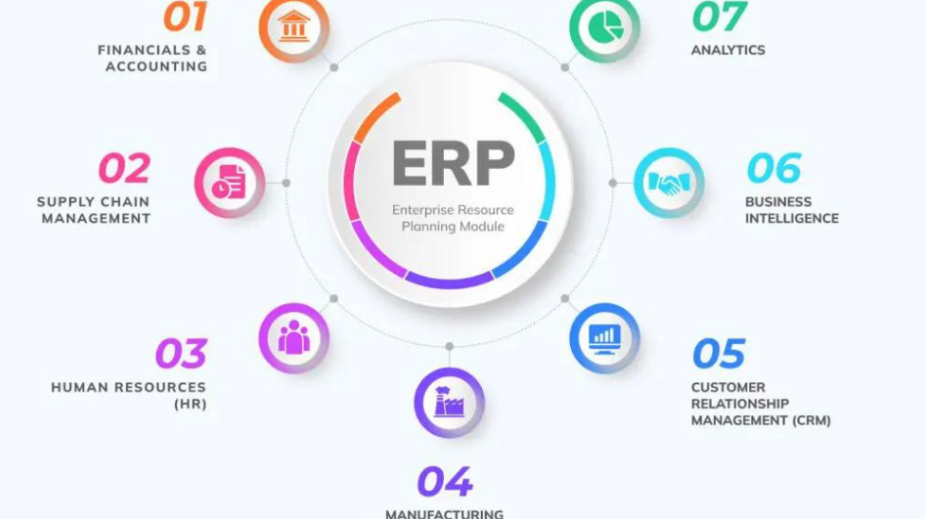
Data Backup and Recovery
Hardware failures, natural disasters, and cyberattacks can destroy business data. Regular backups create copies of information that restore quickly when needed. Automated backup schedules eliminate dependence on manual processes.
Backup redundancy stores copies in multiple locations. Cloud-based backups protect against local disasters. Geographic separation ensures data survives regional events.
Recovery time objectives define how quickly systems must come back online. The ERP should support your recovery requirements through redundant systems and failover capabilities. Downtime costs money and damages reputation.
Compliance Management
Various regulations govern how businesses handle data. GDPR protects European citizen information. HIPAA secures healthcare records. SOX mandates financial controls for public companies. Your ERP must support compliance with relevant regulations.
Data retention policies automatically archive or delete information based on requirements. The system prevents premature deletion while avoiding unnecessary storage of outdated data. Compliance reports document adherence to regulations.
Privacy controls let you restrict access to sensitive personal information. Encryption protects data during transmission and storage. These measures satisfy regulatory requirements and build customer trust.
Mobile Access and Cloud Deployment
Business doesn’t stop when you leave the office. Mobile capabilities and cloud deployment extend ERP access beyond traditional boundaries. These modern ERP features support today’s flexible work environments.
Mobile Application Functionality
Smartphones and tablets enable work from anywhere. Mobile ERP apps let employees access essential functions while traveling or working remotely. Sales teams check inventory availability during customer meetings. Managers approve purchase orders from home.
Offline capabilities maintain productivity when internet connections fail. The app stores data locally and synchronizes when connectivity returns. Users never stop working due to temporary network issues.
Mobile-optimized interfaces adapt to smaller screens. Touch-friendly controls replace mouse-driven navigation. Information displays clearly without zooming or horizontal scrolling.
Cloud-Based vs. On-Premise Deployment
Cloud ERP runs on vendor servers accessed through the internet. You avoid hardware purchases, maintenance, and IT staffing requirements. Updates happen automatically without service disruptions.
Subscription pricing spreads costs over time instead of large upfront investments. Monthly or annual fees include software, infrastructure, and support. Predictable expenses simplify budgeting.
On-premise systems install on your own servers. You control the hardware, security, and upgrade schedule. This approach suits businesses with specific security requirements or unreliable internet access.
Hybrid deployments combine cloud and on-premise elements. Critical systems stay in-house while other functions run in the cloud. This flexibility accommodates complex requirements and gradual transitions.
Vendor Support and Training Resources
The best software fails without proper implementation and ongoing support. Vendor services determine whether your ERP investment succeeds or struggles. Evaluate these factors carefully before committing.
Implementation Assistance
ERP implementation involves more than software installation. Process analysis identifies improvement opportunities and optimal system configuration. Implementation teams bring experience from similar projects.
Data migration transfers information from old systems to the new ERP. Clean, accurate data ensures a smooth transition. Vendors should offer migration tools and services.
Testing phases catch problems before going live. User acceptance testing involves actual employees performing real tasks. Issues get resolved when stakes are low rather than during production use.
Training Programs
Employee adoption determines ERP success more than any technical factor. Comprehensive training helps users understand new processes and tools. Multiple training formats accommodate different learning styles.
Role-based training focuses on functions relevant to specific jobs. Accountants learn financial features while warehouse workers master inventory functions. Targeted instruction improves retention and reduces overwhelm.
Ongoing education keeps skills current as the system evolves. Refresher courses reinforce concepts and introduce new features. Online resources let users learn at their own pace.
Technical Support Services
Problems and questions arise despite excellent training. Responsive support resolves issues quickly and minimizes disruption. Multiple contact methods including phone, email, and chat provide convenient access.
Support availability should match your business hours. 24/7 support helps global operations and handles emergencies. Tiered support escalates complex problems to specialized technicians.
Self-service resources empower users to find answers independently. Knowledge bases, video tutorials, and community forums provide information on demand. These resources reduce wait times and support costs.
Scalability and Future Growth
Your business changes over time. Markets expand, product lines grow, and operations become more complex. The ERP must scale alongside your business without requiring replacement.
User and Transaction Volume
Adding users shouldn’t require system replacement. The ERP should accommodate growing teams without performance degradation. Licensing models should scale affordably as headcount increases.
Transaction volume grows as business expands. The system must handle increased orders, inventory movements, and financial activities. Performance testing reveals how systems behave under heavy loads.
Geographic Expansion Support
Opening new locations brings operational complexity. Multi-location support manages separate facilities while maintaining centralized visibility. Each location operates independently yet contributes to company-wide reporting.
International expansion requires multi-currency and multi-language capabilities. The system must handle various tax structures and regulatory requirements. Localization features adapt to different countries and regions.
Industry-Specific Functionality
Generic ERP systems work reasonably well for many businesses. However, industry-specific solutions provide specialized features that generic systems cannot match. Manufacturing, retail, healthcare, and other industries have unique requirements.
Vertical solutions include best practices and processes specific to your industry. You benefit from accumulated knowledge rather than figuring everything out yourself. Implementation happens faster with proven approaches.
Module additions expand functionality as needs evolve. Start with core financial and inventory features, then add manufacturing or service management later. Modular architecture prevents paying for unused capabilities.
Total Cost of Ownership Considerations
The purchase price represents just one component of ERP costs. Understanding total cost of ownership prevents budget surprises and enables accurate comparisons between options.
Licensing and Subscription Fees
Perpetual licenses involve large upfront payments for permanent software usage rights. Annual maintenance fees cover updates and support. This model suits businesses preferring capital expenditures.
Subscription licensing spreads costs over time through monthly or annual payments. You always use the current version without separate upgrade fees. This approach aligns with operational expenditure preferences.
User-based pricing charges per person accessing the system. Concurrent user licensing costs less by charging for simultaneous users rather than total employees. Choose the model that matches your usage patterns.
Implementation and Customization Costs
Professional services fees cover implementation consulting, configuration, and training. These costs often exceed software licensing. Complex implementations require extensive services.
Customization expenses add up quickly when standard functionality falls short. Custom development charges by the hour with rates varying by vendor. Minimize customizations to control costs.
Data migration services ensure clean, accurate information in the new system. Poor data quality causes ongoing problems. Professional migration services prevent these issues.
Ongoing Maintenance and Upgrade Expenses
Annual maintenance fees typically run 15-20% of license costs for on-premise systems. These fees cover technical support and software updates. Budget for these recurring expenses.
Cloud subscriptions include maintenance and updates in monthly fees. You avoid separate maintenance charges but pay subscription fees indefinitely. Calculate long-term costs for accurate comparisons.
Upgrade projects require time and resources even with included software. Testing, training, and change management cost money and consume staff time. Plan for these periodic investments.
ERP Features Comparison Table
Here’s a quick reference comparing essential features across ERP categories:
| Feature Category | Small Business Focus | Mid-Market Needs | Enterprise Requirements |
|---|---|---|---|
| Financial Management | Basic accounting, invoicing | Multi-company, budgeting | Global consolidation, advanced analytics |
| Inventory Control | Simple tracking | Multi-location, basic warehouse | Advanced warehouse, lot tracking |
| CRM Integration | Contact management | Sales pipeline, marketing | 360° customer view, service management |
| HR/Payroll | Basic employee records | Time tracking, benefits | Talent management, succession planning |
| Reporting | Standard reports | Custom reports, dashboards | Advanced BI, predictive analytics |
| Deployment | Cloud preferred | Cloud or hybrid | Hybrid or on-premise options |
| Mobile Access | Basic mobile app | Full mobile functionality | Offline capable, field service |
| Customization | Limited configuration | Moderate customization | Extensive customization capability |
| Integration | Key apps only | Multiple integrations | Enterprise-wide integration |
| Support | Email/chat support | Phone support, training | Dedicated account manager |
Frequently Asked Questions
What are the most important ERP features for small businesses?
Small businesses should prioritize financial management, inventory tracking, and basic CRM capabilities. Cloud deployment reduces upfront costs and IT requirements. Look for user-friendly interfaces that require minimal training. Integration with existing tools like payment processors and e-commerce platforms matters more than advanced features you won’t use immediately.
How long does ERP implementation typically take?
Implementation timelines vary based on company size and complexity. Small businesses with straightforward processes might complete implementation in 3-6 months. Mid-sized companies typically need 6-12 months. Large enterprises often require 12-24 months or longer. Proper planning, data preparation, and employee training significantly impact timeline success.
Can I start with basic ERP features and add more later?
Most modern ERP systems support phased implementation. Start with core modules like finance and inventory, then add manufacturing, CRM, or other modules as needed. This approach reduces initial costs and overwhelming change. Ensure your chosen system offers the modules you might need eventually, even if you don’t implement them immediately.
What’s the difference between ERP and accounting software?
Accounting software focuses solely on financial management—bookkeeping, invoicing, and financial reporting. ERP systems include accounting plus inventory management, CRM, HR, manufacturing, and other business functions. All modules share the same database, eliminating duplicate data entry and providing company-wide visibility. Choose ERP when you need integrated management of multiple business areas.
How much does ERP software typically cost?
Costs vary dramatically based on system scope, user count, and deployment model. Small business cloud ERP might cost $50-200 per user monthly. Mid-market solutions range from $500-5,000 per month plus implementation fees. Enterprise systems require six or seven-figure investments. Remember to budget for implementation, training, customization, and ongoing maintenance beyond software licensing.
Is cloud ERP more secure than on-premise solutions?
Modern cloud ERP providers invest heavily in security infrastructure that most businesses cannot match independently. They employ security specialists, implement advanced protection measures, and maintain redundant systems. However, you surrender some control to the vendor. On-premise systems give you complete control but require significant security expertise and investment. Both can be secure when properly managed.
Making Your Final Decision
Selecting the right ERP system requires careful evaluation of your specific business needs. The ERP features discussed in this guide provide a comprehensive framework for assessment. However, your unique situation determines which features matter most.
Start by documenting your current pain points and desired improvements. Involve employees from different departments in the evaluation process. Their input reveals requirements you might otherwise miss. Create a weighted scorecard that ranks features by importance to your business.
Request demonstrations from multiple vendors focusing on your priority features. Watch how the system handles your specific scenarios rather than generic presentations. Ask tough questions about limitations, customization requirements, and total costs.
Check references from similar businesses in your industry. Learn from their implementation experiences and ongoing satisfaction. Understand what went well and what they would change if starting over.
Remember that ERP selection represents a long-term commitment affecting every aspect of your business. Take time to evaluate thoroughly rather than rushing the decision. The right choice transforms operations and drives growth. The wrong choice creates years of frustration and expensive do-overs.
Invest the effort now to select wisely. Your future self will thank you when the system supports your business growth seamlessly. The critical ERP features outlined here guide you toward success. Use them to find the perfect solution for your organization’s unique needs and goals.


